
The 3G mobile network is being phased out across New Zealand to make room for newer technology like 4G and 5G. When 3G is turned off, any device that relies only on a 3G SIM connection will no longer connect via mobile data. If your terminal uses a 3G SIM, the mobile connection will stop working when the 3G network shuts down. However: Your terminal will still work over WiFi or Ethernet. Only the SIM/mobile connection is affected - so there's no need to rush into upgrading if you have another way to connect. Please contact us if you need any further information.

Terminal Checker


The easy way to check if your EFTPOS machines are up to date.
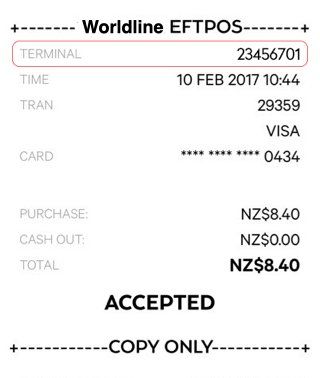
EFTPOS receipt

Make sure your EFTPOS terminals are complying with the required software and hardware standards with our easy to use terminal checker. Simply enter your Terminal ID below and find out whether you need to contact your terminal provider or if you are sorted to continue transacting safely. You can find your terminal ID/s listed on your EFTPOS receipt/s.

Check your terminal status

There was a problem with some of the details
you submitted, please try again.

This data is refreshed daily so check back here tomorrow
to confirm any changes you’ve made to your EFTPOS terminal today.

The terminal ID entered requires a software update. This Terminal’s software will sunset on 30 April 2017. Please contact your terminal provider and arrange an upgrade.

This data is refreshed daily so check back here tomorrow
to confirm any changes you’ve made to your EFTPOS terminal today.

Need more information?

Click here for everything you need to know about
EFTPOS terminals and technology.